
Chapter 12
Git
When a folder is in a Git repository, Manta shows each file's status right in the list, the branch in the path bar, and a Git panel for staging and committing. git must be installed on your Mac (with the Xcode Command Line Tools, for example).
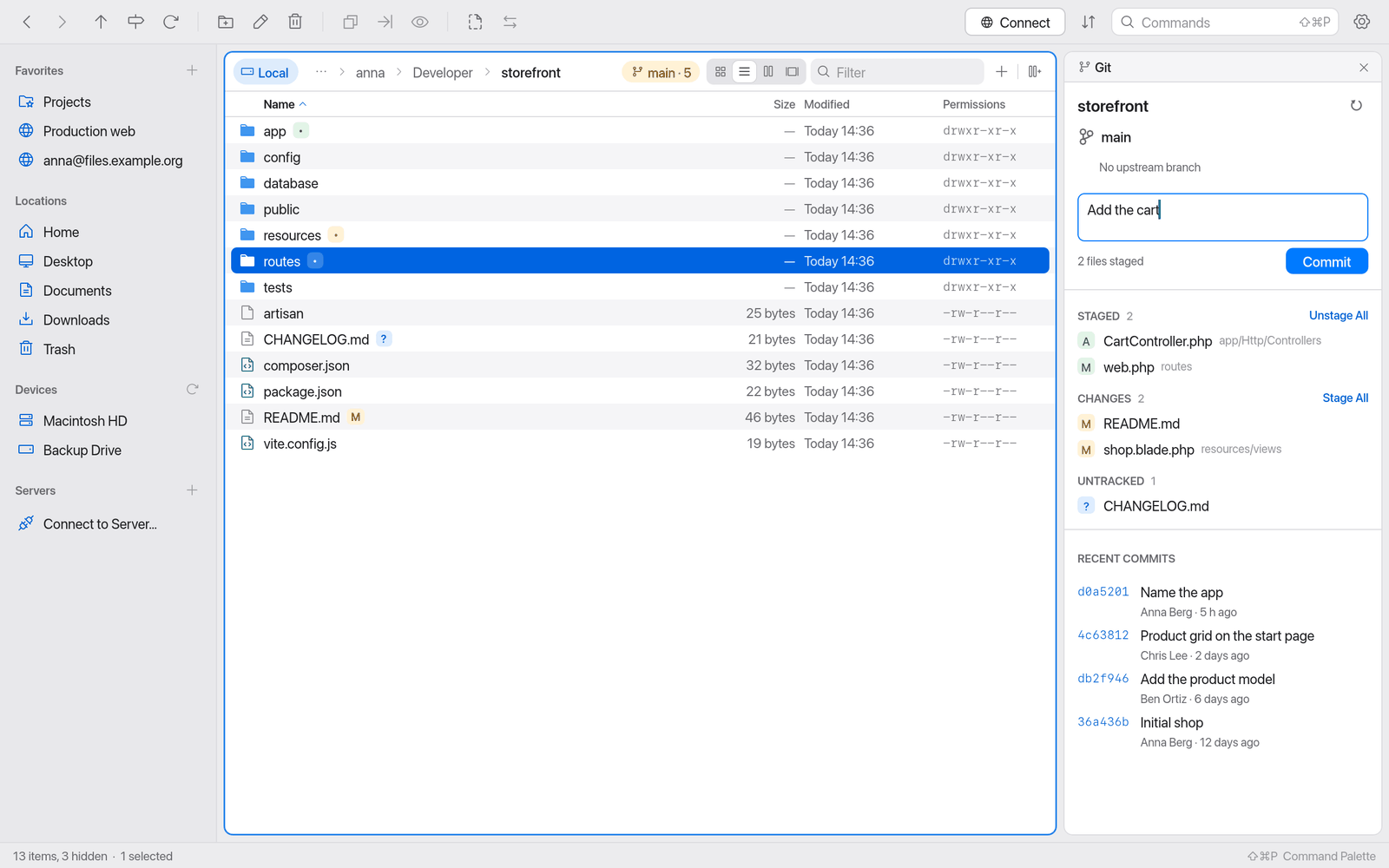
Status in the file list
Changed files have a badge. Hover over it and a tooltip explains the status:
- Modified, not staged / Staged for commit / Modified, partly staged
- Added, staged for commit
- Untracked (new, Git doesn't know the file yet)
- Deleted, not staged / Deletion staged for commit
- Renamed from … / Copied from …
- Merge conflict
- Ignored by .gitignore – such files are dimmed.
Folders show how many changed files they contain ("3 changed files inside").
Branch in the path bar
A chip in the path bar shows the current branch. Its tooltip tells you more:
- which upstream branch it tracks and whether you're ahead or behind ("Tracking origin/main (2 ahead)"),
- the last commit,
- "Detached HEAD at …" when no branch is checked out.
If a merge, rebase, cherry-pick, revert or bisect is in progress, the chip shows it. Clicking the chip opens the Git panel.
The Git panel
To show or hide it: ⇧⌘B (Toggle Git Panel) or click the branch chip.
The panel shows:
- at the top the branch, upstream and how many commits there are to push or pull,
- the groups Conflicts, Staged, Changes and Untracked,
- a field for the Commit message,
- the Recent Commits.
Commit changes
- Open the Git panel with ⇧⌘B.
- Stage files: Stage on a file, or Stage All on the Changes group.
- Click a file to see its diff.
- Type a Commit message.
- Click Commit or press ⌘↩.
Manta reports "Committed abc1234: …".
To undo staging: Unstage or Unstage All.
Resolve conflicts
During a merge conflict the affected files are listed under Conflicts. Resolve the conflict in your editor, then Mark as resolved (stage). When all are resolved, the panel says "Commit to finish the merge". For rebase, cherry-pick and revert it shows the matching --continue command for the terminal.
Refresh
Manta refreshes the Git status automatically. If needed: Refresh Git Status in the command palette, or the refresh button in the panel.
Limitations
- Git works for local folders only ("Git status is available for folders on this Mac, not on servers.").
- Push, pull, switching branches and merging are done in the Terminal or a Git app. The panel shows the status, stages and commits.